Installation
The latest POSE deb package is broken, so we need a replacement. A Reddit user provided a hint that you can easily unpack .rpm files meant for Suse Linux and simply run the extracted executable. And this works.
Just get "pose-3.5-2.i386.rpm" from
https://sourceforge.net/projects/pose/files/pose/3.5-2/
and extract the .rpm file.
If the file is not available, you can download it also from here: pose-3.5.2.i386.rpm
You will get "opt" and "usr" directories. You only need to copy the included files into the corresponding paths on your machine:
sudo rsync -av opt /
sudo rsync -av usr /
Before you are able to start POSE with a simple "pose" command, install "libxext6:i386" via apt-get:
sudo apt-get install libxext6:i386
If the package is not available, you can download it also from here: libxext6_1.3.3-1_i386.deb
Then run "pose" in your terminal or create a starter with this command.
Optional: Skins
If you want to have a skin other than the default one, just download "pose-skins-1.9-1.noarch.rpm" from
https://sourceforge.net/projects/pose/files/skins/1.9%20et%20al/
extract it and "install" it with:
sudo rsync -av usr /
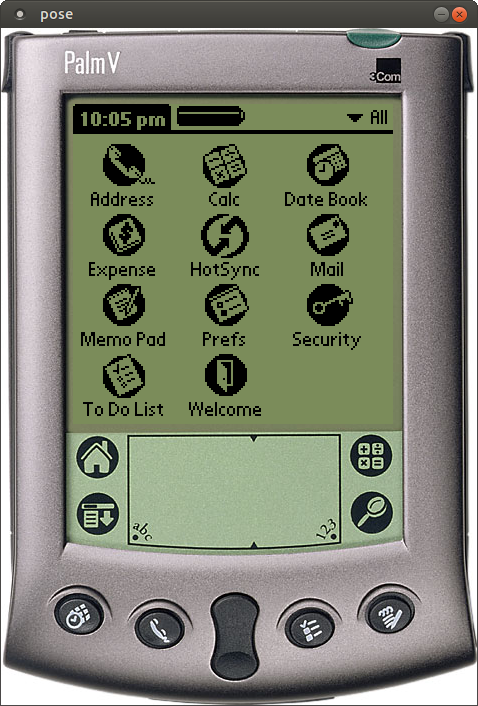
You should now have a nice Palm OS Emulator:
Tips
Sometimes logging can be very helpful. You can enable it via the context menu of your POSE (just right-click on the "screen") and select "Settings" -> "Logging...". The logging file is stored in your home folder after POSE is closed.
By the way: If you have an old Palm device lying around but you don't want to extract the ROM file from this device, will find them an palmdb.net.
Comments on "Installing POSE (Palm OS Emulator) on Ubuntu 18.04 LTS (64-Bit)"
Comments are moderated before publication. Only substantive and constructive comments will be approved.